Grandstream phones, APD-80 and 85638-01 cables
A number of months ago, I deployed a new SIP network using Grandstream GXP-1782 phones. For some of the folks that are always on the phone, we got a couple of Plantronics DECT headsets - which are specificially listed on the compatible headset list published by Grandstream.
The headset plugged into a APD-80 adapter cable. The Plantronics documentation states that a “85638-01 adapter” cable is required - although this is listed as an adapter to extend the APD-80 cable. When you look at the length of the APD-80 cable, this seems nuts - however the 85638-01 cable holds a secret.
Without the special 85638-01 cable, pickup and hangup of the phone was very unreliable. Lots of sites have this documented as a straight through cable - but it is not. The pins on this are actually reversed - ie:
| End One | End Two |
|---|---|
| 1 | 4 |
| 2 | 3 |
| 3 | 2 |
| 4 | 1 |
See example photo:
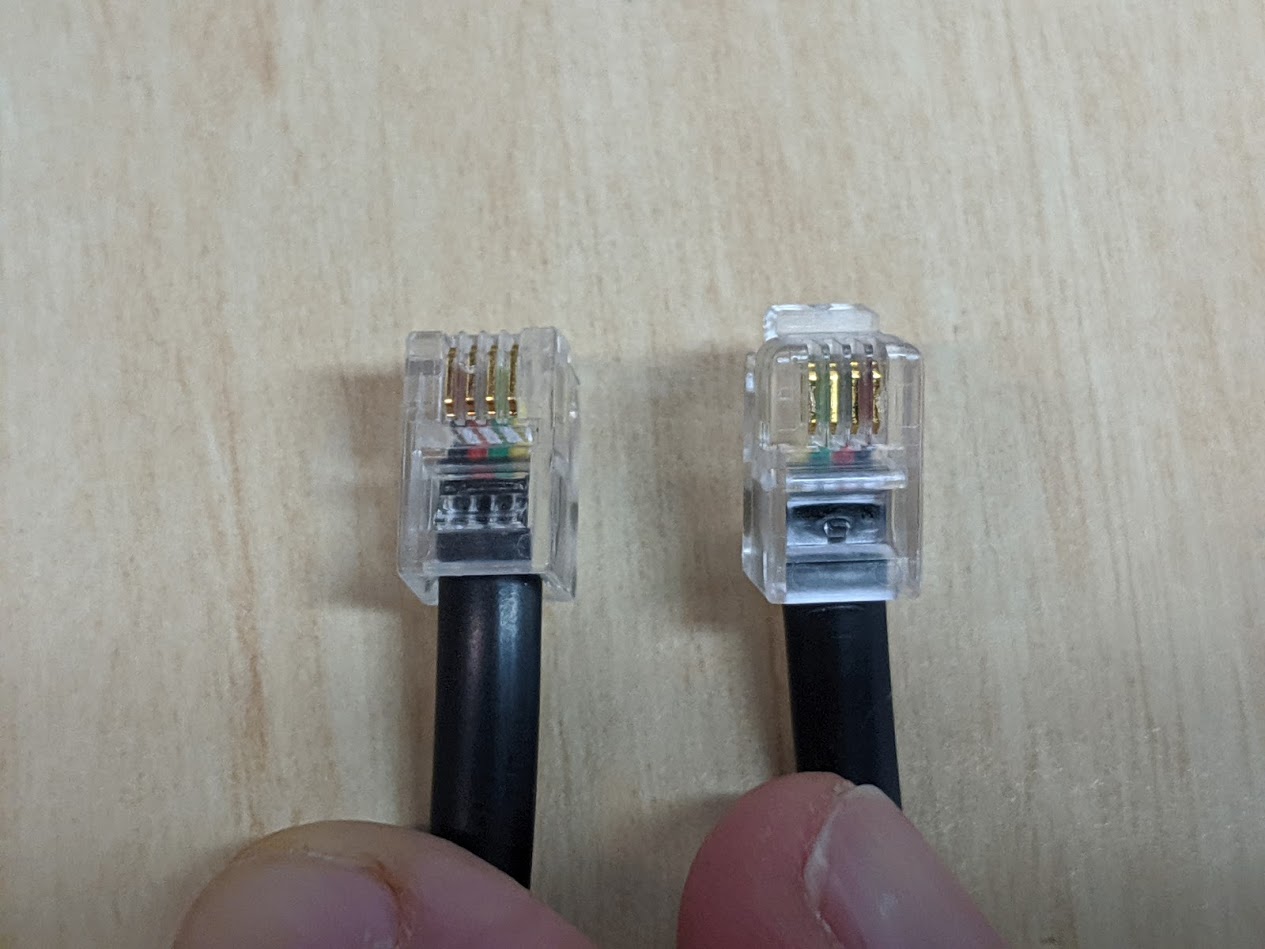
Using this cable, you should find that the hangup and pickup functions work correctly without spending $15 per cable.
Credits to Michael Schneider for discovering this