As a lot of you know, I’ve had lots of trouble with a Pioneer DEH-P7050BT car stereo with bluetooth handsfree. After 6 months of talking with Pioneer to try and get a fix to the many issues I was seeing, they have finally pointed me to a document that Pioneer UK have released at the end of October saying that the unit is not compatible with my Dopod 838 Pro phone. I see this as admitting defeat.
So, I got authorised to return the unit to JB Hifi for a full refund! This I really liked, but it left me with a dilemma – What to do next?
After hunting around the stock of JB Hifi and looking at prices, I stumbled upon a Kenwood KDC-BT7539U on the shelf for $296AUD. Keeping in mind that I just returned the Pioneer unit for $420! My original plan was to purchase a non-bluetooth stereo and a separate Parrot car kit. This is when it was pointed out to me that the bluetooth module in the KDC-7539U is actually manufactured by Parrot!
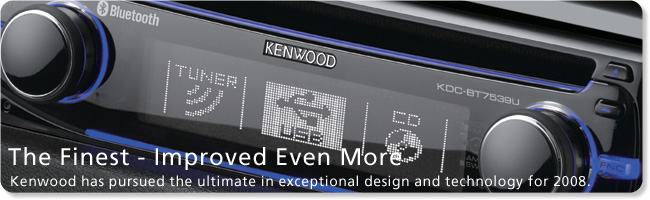
After hassling someone in Strathfield to test the unit out, all seemed to work fine with my device, however Strathfield wanted to charge $429AUD – for the same unit on sale at JB Hifi for $296AUD!
Anyhow – after installing the unit, I paired up my Dopod 838 Pro and things seemed to go fairly smoothly. I had a few minor issues with phonebook syncing, so I downloaded the bluetooth update to version 1.60 from the Kenwood web site. Things seem to be going very well for this unit at the moment – and compared to the DEH-P7050BT from Pioneer, my gripes list is VERY minor:
1) The method to change to preset radio stations is a bit too involved – as you have to rotate the right knob, then select a preset and then press the knob again. I wish I could assign these to just moving the knob to the right or left.
2) The phonebook seems to use the Lastname, Firstname format when displaying phone numbers on the display. I like having this the other way around and I can’t seem to find a way to swap it to Firstname Lastname.
3) To select an option from the settings menu, you have to hold the right knob in for 1 second. When I’m used to just pressing a knob once, it takes quite a bit of time to get used to.
Other than that, the audio quality is suburb. Calls are clear, there is very little noise, I haven’t experienced a call dropout yet, and there aren’t any random hiss/hash noises in my car kit audio. All in all, Kenwood seems to have done an excellent job with this head unit – for almost half the price of the Pioneer 7050BT. When you consider a basic Parrot CK3100 is still selling for around $260AUD, then $270AUD for a Kenwood head unit AND a Parrot car kit is phenomenal value!
Rating: 8.5/10
Audio: 9.5/10
Value: 9.5/10
Bazz says:
Great review on the Kenwood. Before I buy one mail order, can you explain the USB connectivity on this? Does the device have a USB port, or do you need to buy an expensive adaptor cable?
I know for iPod connectivity that you need an iPod connector cable at about $150, so wasn’t sure if USB is the same.
Cheers.
December 8, 2008, 4:23 pmSteven Haigh says:
Hi Barry,
The USB lead is hard wired into the back of the head unit. It’s about 1 to 1.5m in length and has a USB port on the end. Hooking up any USB mass storage device enables the USB source to be selected.
Rotating the right knob on the unit will allow you to browse the currently playing directory – and using the right press/left press allow you to navigate through the directories on the USB stick.
I haven’t been able to find a max storage size for the unit, however it seems to support all the FAT32 features, so I’m guessing around 250Gb or so would be the max size.
December 8, 2008, 4:27 pmMike Jude says:
Hi Steve, great review, been looking at this model for a while, having bluetooth and usb are my main requirements, not fussed about ipod. I also like the 3 line text display, does it give u a full ID tag readout and also is the display easily readable in bright sunlite conditions?
The prices ive seen have been much higher, JB’s Ringwood Vic wanting $599 and Ryder in NSW wanting $449 $17 postage.
Any chance you could fill me in on where you got your great deal.
Thanks, Mike
December 10, 2008, 12:08 pmMike Jude says:
Steve, just rechecked prices at JB’s now $269, just 2 weeks ago they had them at more than double that, glad i wasn’t impatient.
December 10, 2008, 12:17 pmRegards, Mike
Steven Haigh says:
Hi Mike,
The only time I haven’t been able to read the display easily was in direct sunlight – ie driving away from a setting sun – with sunlight shining straight through the back window and onto the stereo. It’s clearly visible in most other conditions that I’ve encountered.
The 3 line display can be customised to show what you want (within reason). The 3 lines I have for USB playback are: Line 1: MP3 & bluetooth functions (this shows battery left and signal level from my phone).
Line 2: Track Name / Artist
Line 3: Album Name
This suits my needs perfectly.
December 10, 2008, 6:39 pmJoe says:
Hi Steven,
Does the music stop when you get a call?
December 11, 2008, 4:04 pmSteven Haigh says:
Hi Joe,
Yes, the music does stop when a call is made – either incoming or outgoing.
December 11, 2008, 4:50 pmAm Sazly says:
Hi Steven,
I bought this unit earlier today after all shop ran out of KDC X9006U and KDCX8009U..
Just few question with regards to this device :
1. somehow i found out the device does not display radio station name by default (most device now days will display it automatically..) any idea why?.. do i hv to manuall set it as adviced in the manual.
2. If you use the device as a hands free unit.. where is the mic?is the sound quality as good as the traditional hands free bluetooth devices?..
Regards,
December 23, 2008, 1:41 amAm Sazly @ Kuala Lumpur, Malaysia..
Steven Haigh says:
Hi Am,
You will need to set the station name manually as per the manuals instructions. As for the bluetooth voice quality, I think it is very much on par with other bluetooth car kits. The audio on both ends is better than the Pioneer unit I reviewed earlier however.
December 23, 2008, 7:35 amAm Sazly says:
Hey again Steve..
Merry Christmas..
I have finally configured the bluetooth function on my device.. calls are clear and i am pleased that i followed your advice.
However i have another problem, when i activate the bluetooth audio function to listen to my mp3s stored in my phone, i noticed that i am able to control the function on my phone via the unit but there is no sound coming out from my car speakers..
Any idea why is that?..
Regards,
Am Sazly
ps: Happy Holidays…
December 25, 2008, 9:31 amSteven Haigh says:
Hi Am,
Hope all is well with you and your family at this time of year.
I noticed that the BT Audio function on my phone didn’t register until I set the unit as a Bluetooth Stereo. It doesn’t automatically connect and it seems I need to do this manually. This is probably how my phone works. I didn’t know the controls would work on the head unit for the phone – that’s just cool
December 25, 2008, 11:31 amVin says:
Hi there,
I paired up my n82 with the head unit, but when there’s an incoming call and i picked it up, there’s no sound coming out from my speakers, do i have to set it somewhere? although i can still speak through the mic and the recipient can still hear it.
Is it something to do with my n82 bluetooth settings? or is it because the sound needs to come out from front speaker only? (i currently do not have front speaker)
December 29, 2008, 11:19 pmSteven Haigh says:
Hi Vin,
By default, the audio from the bluetooth section comes out the front speakers only. You can change this to all speakers or rear only in the menu options. I think its around page 33 in the manual.
December 30, 2008, 6:44 amVin says:
erm, may I know exactly how do I do it? I read the manual for few times already and I still couldn’t get the audio source to come from the rear speakers.
December 30, 2008, 11:12 amSteven Haigh says:
Hi Vin,
My mistake. The option you are looking for is “SP Select” in the Standby menu. The options are “Front”, “F-R” and “F-L”. The function is explained in detail on page 31 of the English manual. It looks like you will need to hook up some speakers to the front outputs of the stereo!
December 30, 2008, 12:42 pmVin says:
I see, I wonder if I swap the wires for the rear speaker to be connected to the front input will create a temporary measure for my situation.
December 31, 2008, 8:50 pmSteven Haigh says:
That would work.
December 31, 2008, 9:19 pmMaurice says:
Hello Steven,
January 4, 2009, 10:38 amThanks for the review. It is quite helpful. I was given this unit for Christmas and I am having trouble working out the hands free calling function via BT. According to the manual, which is very hard to decipher, I think I have to press a series of buttons before and then after the dialled number is selected. That doesn’t seem like hands free to me. Can you shed any light on how to make the hands free capability work properly?
Steven Haigh says:
Hi Maurice,
I have found dialling via the hands free very hit and miss – simply because it’s a bit complex. I have a nice, fat, finger-friendly dialler on my Dopod 838 Pro and it’s easier to dial via that. What I have found good however is that if you dial from the remote, you just press the phone button, then dial the number using the digits on the remote, then press OK (or phone again, I can’t recall exactly at the moment). This is easier than dialling from my phone!
My Dopod 838 Pro supports voice dialing – it does this by recognising the voice itself, however as yet I haven’t been able to figure out how to get this to work via the Kenwood.
January 4, 2009, 10:42 amGarth says:
Hey there Steven, what a great review thang your doing here, you have such a very good understanding of the unit already, fantastic….
well I installed mine in 2 days ago, the excitement is starting to wear thin although it is all and everything more than I expected at a great price compared to others
anyway re: controlling BT audio players, you mentioned something about setting the unit as a BT Stereo?? I cannot find anything about this and have tried regisering my 3G IPHONE as a BT device and or a SPECIAL BT DEVICE, but it comes up as unknown, although the calling handsfree features work in entirety and to perfection (I paired my IPHONE to the unit from my phone which worked fine for this), I’m just wondering if it’s because I haven’t set it to be a “bluetooth stereo” and maybe this is why no BT audio is available??
January 5, 2009, 2:31 pmSteven Haigh says:
The Bluetooth Stereo profile is using the A2DP profile. I’m not sure if the iPhone supports A2DP, however if it does, when you pair the with it, you should see 3 options available. On my phone for example, I see: “Handsfree Adapter”, “Serial Port”, and “Wireless Stereo”. Again, if your mobile device doesn’t support these, you may see different options.
January 5, 2009, 5:45 pmSteven Haigh says:
Kenwood have now released an update for the Bluetooth module. Read more…
January 8, 2009, 10:21 amGraham says:
Hi. Great review – might try out this deck with my iPhone 3G. By the way the iPhone 3G does not support A2DP so you won’t get stero sound via the car radio when using bluetooth.
I haven’t done enough research yet but it looks like all I can get at the moment for the iPhone 3G is something like this:
* Cable connection for charging – probably straight to the cigarette lighter
* Bluetooth for phone connection to the radio
* Headset jack for listening to stereo audio through the radio.
Ideally I’d like to be able to charge and connect to the radio for music and phone via the iPhone connector on the bottom of the phone but I’m not sure if this is even possible. I don’t want to use BT if I can avoid it as it drains the iPhone battery that little bit faster (when not plugged in and charging) and hate having to turn it on and off when I get in and out of the car.
An acceptable solution could be to have a separate cigarette lighter based charger and then have an audio jack like the one supplied with the iPhone 3G that has both mic and stero audio (a sort of 3 banded stereo jack). This would then use the radio as the audio input/output as though it was just a big headset.
Still looking around for the perfect solution – or at least as close as I can get…
January 20, 2009, 6:37 pmTravis says:
I have recently had this stereo installed to be used with my iPhone 3G. It works flawlessly apart from a doggy microphone which is being replaced. The iPod cable (to play music) that comes with the Kenwood was not fully compatible with the iPhone, as it does not correctly charge or display the music playing. To overcome this problem I simply bought another Apple iPhone 3G USB cable. Now it charges, and displays the names correctly. Phone calls still need to be through BT, but it works great. Using the new cable also makes the unit 100% compatible with the new iPod Nano 4th Gens.
On a side note; using the official iPhone 3G cables also makes the iPhone 3G compatible with pioneer, but not Sony. The wiring has changed in the connectors for the iPhone 3G and Nano 4th Gen, so make sure you are using the Genuine cable. On the iPhone you’ll still get the “not made for this device” message, just say “no” to “airplane mode” and you’re away.
January 23, 2009, 12:20 pmPen says:
Ok guys after reading all these great reviews,(all about the bluetooth)can any one tell me how does the OEM remote interface works,i was hoping to just connect to my Ford AU2 with a CAT10 steering wheel interface,or may be i dont need it,not sure what does any one recommend.Thanks Pen.
January 23, 2009, 10:51 pmiskandar says:
hello…
February 4, 2009, 2:55 amas u mention earlier, u download kenwood bluetooth update? did u then upload it to player?
Steven Haigh says:
Yes. You need to follow the instructions included in the upgrade document.
You can find the details on the latest update here.
February 4, 2009, 2:38 pmAngela says:
Hi Steve,
February 15, 2009, 7:50 pmThanks so much for this blog, it’s great! I have bought this deck, but I am having trouble with the BT functioning with my Nokia 6300. Almost everything functions really well, but the mic doesn’t seem to work. I have made several calls, but no-one seems to hear me, whether it’s an incoming or outgoing call. Any clues on how to fix the problem???
Steven Haigh says:
Check to see if the microphone is correctly plugged in as a first – as it’s easy to snag this cable and unplug this connection. If this doesn’t help, check to see if you have pierced the microphone cable during installation – as this is a common problem. If this is the case, you only have an option to purchase another microphone.
February 15, 2009, 9:39 pmPhil says:
Hi Steve
Based on your review I upgraded my 7050 to the kenwood.
Just a couple of questions that you may be able to help me with.
1 Page 13 of manual says a “BT” indicator is lit when a phone is connected. I dont see any indicator.
2 how can you quickly move to the end of the ipod when searching album or artists? Quick way to get to zztop…
Help appreciated phil….
March 9, 2009, 10:07 pmPhil says:
Sorry one more thing
Does the phone download every time you connect?
thanks again phil…
March 9, 2009, 10:09 pmSteven Haigh says:
Hi Phil,
The BT indicator shows on only certain display settings. In the DISP -> TYPE menu, I use layout D. For me, this shows the BT icon on the screen as well as the mobile battery life and current signal level.
I can’t really help with the iPod question, as I only use a 2Gb USB stick at the moment, however if you press in the right hand knob, you should get a directory listing type display.
As for the Downloading… that shows on the screen. This happens every time the handset connects. It should follow “HF Connect” being shown on the screen.
March 10, 2009, 8:55 amJason says:
Hi Guys,
Love the unit but cant get the bluetooth to work with my iphone properly.
It connects downloads the address book, dials numbers receives calls but I cannot hear anything..
Very strange..
Has anyone heard of this problem?
Thanks
March 13, 2009, 10:55 amPhil says:
Jason
I bet you don’t have front speakers?
You need to have front speakers enabled.
Steven
Thanks for your help previous.
My only gripe with the unit is no ABC search function when in USB/ipod mode, Hundreds of turns of control knob required to get to the last album or artist. All else works great bluetooth never misses a beat.
cheers phil….
March 15, 2009, 5:13 pmBirdMan says:
Hi Steve,
I have just hooked up this unit in my Toyota Prado. I used Aerpro harnesses to plug from the deck to the EOM wiring. All plugged in OK (double and triple checked wiring) but cannot get sound from either fron speaker. Fader runs from rear to silence in the front. I am sure I haven’t failed to wire BOTH front speaker correctly. Is there a setting in the menus that would disable one set of speakers? I have reset it factory settings and still no sound.
March 18, 2009, 8:02 pmcheers for any advice
Julesmcm says:
Hi Steve,
April 22, 2009, 9:31 pmI’m in the market for a car stereo for my husband’s birthday. I know nothing about car stereo’s, but he has said he wants something that plays MP3′s and has bluetooth for his phone. So I’m guessing this model would be suitable, right??? The problem I’m finding is that everywhere seems to suggest that this model is discontinued??? Any suggestions? Thanks HEAPS for any help/advice!
Steven Haigh says:
Hi Jules,
You seem to be right. It looks like this model is not current – however there doesn’t seem to be something along the same lines. There are a number of units that are currently available, but none seem to have the same feature set. The current units (assuming you are in Australia!) are here. It seems they are favouring the iPod control vs just a USB storage device (USB hard disk or USB key).
Might be worthwhile contacting Kenwood directly – as they have always been excellent when I’ve had to call them for other devices. They usually have multiple ideas or suggestions – or might even be able to help you track down a BT7539U!
April 22, 2009, 9:39 pmJulesmcm says:
Hi Steven,
Thanks so much for getting back to me. I have rung Kenwood and left them a message, so I’m crossing my fingers they get back to me with some help. In the meantime, I’m thinking that perhaps the Kenwood KDC-BT7043U might be suitable as it has the 2 main things that my husband requested – Bluetooth and MP3 compatible. Do you know anything about this model at all? I haven’t been able to find any reviews. Or if not, is there something similar in another brand that you have experience with and can recommend??? I’m steering clear of the Pioneer DEH-P7050BT based on your recommendation!!! Thanks again!!!!
April 23, 2009, 2:43 pmSteven Haigh says:
Hi Jules,
I haven’t personally used the BT7043U so I can’t really comment on it. If it uses a Parrot bluetooth module like the BT7539U does, then it should work just as well.
I’m sure that Kenwood will get back to you, and may well recommend the one you found.
April 23, 2009, 2:47 pmJulesmcm says:
Hi again Steven,
Just got off the phone from Kenwood. You’re right – they were happy to help. The guy informed me that the KDCBT7043U CD/MP3 TUNER WITH USB AND BLUETOOTH is the direct replacement for the BT7539U and that the features were much the same. He also mentioned that the KDC-XBT8013U is the next model up, and has an external mic, which I guess means the sound quality would be better with the Bluetooth. It also apparently has some groovy colour changes or something too. It’s only a difference of around $50 so it might be worth it just for the external mic. Unfortunately, I’m not that ‘savvy’ when it comes to this stuff, and didn’t think to ask if it uses a Parrot bluetooth module, but given he said it was the new model of the BT7539U I think I’ll risk it!! Thanks again for your advice – MUCH appreciated!!!!
April 23, 2009, 3:19 pmSteven Haigh says:
Hi Jules,
I figured that would be the case. Do yourself a favour and get the model with the external microphone for the hands free features. It’s a little more difficult to install, however the audio quality for hands free conversations is MUCH better than units with an inbuilt microphone.
April 23, 2009, 3:25 pmJulesmcm says:
AWESOME! Consider that to be my choice! I have found a good price on it ($395) at Soundmaster in Granville. I can always get them to install it for him if he kicks up a stink!
April 23, 2009, 3:40 pmJulesmcm says:
Hi again Steve!
May 13, 2009, 3:06 pmFinally went out and bought this unit today for my husband’s birthday (next week). I have what is probably going to sound like a VERY stupid question for you. I just noticed on the box that it says ‘CD-receiver’ (ie no ‘slot’ for CD’s!) This is similar to my husband’s current Pioneer stereo, and he has a CD stacker under the passenger’s seat. I was just wondering, can the Pioneer stacker be hooked up to work with the new Kenwood head unit??? He doesn’t play CD’s much, but it would be handy!!!! Thanks so much!
Steven Haigh says:
Hi Jules,
I have no idea about CD changers. I tend to figure that I can fit more on a USB stick than I can in any CD stacker – which makes any stacker pretty much useless. That being said, Kenwood could probably advise if they have a cable to hook up your existing Pioneer stacker…
May 13, 2009, 5:08 pmJulesmcm says:
Good point. Considering this unit has a USB interface, he’ll probably never use a CD again anyway! Incidentally, the Bluetooth is a Parrot one, like the previous model. Thanks again so much for your help!
May 13, 2009, 6:28 pmSimon says:
It seems that the replacement unit – KDC-BT7043U does not support Bluetooth Audio Streaming. I purchased and had it installed yesterday. The instructions make no mention of audio streaming or support for A2DP and my bluetooth phone does not show any audio services associated with the stereo. I have emailed Kenwood and will post the reply.
The USB port will only read from the first drive/partition. I use a Blackberry Bold with 16Gb micro-SD card. Unfortunately, the 1GB internal memory is the first drive and the only memory that the stereo will read. I bought this unit to play music from my blackberry media card and now find I can’t use it either via USB or Bluetooth. Obviously I am quite annoyed at this stage.
May 20, 2009, 10:46 amSimon says:
I managed to find the specs for both the new KDC-BT7043U and the old KCC-BT7539U from the Kenwood Singapore site. Notice how Bluetooth (Audio Profile) is listed as a feature for the old one but not the new one. Why why why?!!!?
http://sg.kenwood.com/Car_Entertainment/1DIN_Receivers/KDC-BT7539U
May 20, 2009, 12:01 pmhttp://au.kenwood.com/Car_Entertainment/Bluetooth/KDC-BT7043U
Simon says:
Seems like the next model up supports bluetooth audio. Soundmaster called Kenwood to check and did the install for me. It’s worth the extra $80 because the KDC-XBT8013U has a much better display, the menu system is easier to navigate and the external mic works better. Great service from Soundmaster. Stay away from the BT7043U though. Kenwood updated their bluetooth compatibility site yesterday:- http://www.kenwood.com/bt/information/
May 21, 2009, 9:07 amAsh says:
Took 2 months to order the KDC-XBT8013u cd player. Finally got on the 19th of May. The long wait sure was worth it. I am very impressed with this unit as i have upgraded from a previous Kenwood model that is about 4 years old.
May 26, 2009, 10:27 pmI installed this unit myself and was surprised to see kenwood is still using the same speaker connect from the previous model which is great. The Hands free works great, very clear, lots of option to get it setup just right. I use a sony W880i phone that i can also use to stream music via blue tooth. (not that i would use that very often when there is USB storage support) I havn’t been able to figure at as to why my contacts on the cd player are not being updated when i add a new contact in my phone :S This i will have to spend more time on when time is available. Originally I couldn’t get the contact to show on the cd player. after i powered off and powered my phone back up it then synced. Whats the point of having voice dial recognition when you have to go through 4,5 menus to then speak the name you want to ring??? I found the favorites option very handy. Its great for quick access to ring a person you have added to your favorites list. Everything is pretty much adjustable including the display colours, speaker size front/rear/sub, frequency range, speaker distance from cd player, changing the way the screen looks, what info is displayed, mic gain, mic sound reduction. This is a cd player where you find more and more features to fiddle with every day
Graham dJ says:
Hi Steve,
June 20, 2009, 7:53 pmGreat info through your review. Just installed in an classic Jag, can i change the colour of the lighting. Hate the blue would like white or green. Can this be done? The book is real confusing to follow. Graham
Steven Haigh says:
Hi Graham, The good news is that you can have any colour in the lighting – as long as it’s blue!
June 21, 2009, 12:16 pmRichard says:
So after much research I bought the Kenwood KDC-XBT8013U. I’ve had it about a month and this is what I’ve found:
It works with:
iPod Nano (2nd gen I think – it’s old!)
iPhone 3Gs (including Bluetooth)
It doesn’t work with:
400Gb or 320Gb WD Passport External USB HD
iPhone 2G
Maybe the HDs are too big – I tried with only a couple of albums on there (loaded using the Kenwood software) but it didn’t recognise either of the drives. Spoke to their support person and he didn’t seem to have heard of USB powdered external hard drives, said he’d call back. Didn’t.
I can work around the HD thing, I’m thinking maybe a second hand iPod for the car as most of my music is in iTunes anyway.
But, I have a bigger issue. The control knob is awful. Both my girlfriend and I find it so infuriating to use and it’s not intuituve. Do you turn it, press it, press and hold – not that it will matter much as it’ll more often than not do the opposite anyway. For this one reason alone I would say give this unit a miss – it’s an awful design and ruins the unit completely. The left hand side knob serves no purpose at all – except to maybe raise your expectiation that maybe it will do something – it does, but nothing useful.
And where is bass and treble adjustment? I can specify the distance from and size of my speakers but I can’t adjust bass or treble? Maybe I’m missing it in the myriad if features and maybe I’m old school for expecting to have these available with ease.
I really don’t like this unit.
July 13, 2009, 3:26 pmSteven Haigh says:
Hi Richard,
The reason a USB HDD doesn’t work is that they usually require more than 500mA of current that the USB hard drives require. I have an 80Gb USB external HDD connected to a custom made power adapter which can supply 1000mA to the USB HDD. This seems to work ok, however there are fluctuations in the power from various bits of the car electrics which I need to sort out.
After sorting this out I will put some details on my site on how I got this working.
While Kenwood say they support USB drives, in reality they only mean flash drives – as they will run with the 500mA given by the unit as per the USB specifications.
I can’t really comment on the location of the treble and bass controls – as chances are they will be different on mine than on yours.
July 13, 2009, 7:22 pmPete C says:
Hi Steve
Nice meaty review. Just a couple of questions.
Does it perform handsfree answering?
Does it download and sync contacts with iphone 3G(S)?
Does it support voice dialling with iphone 3G(S)
Cheers
July 14, 2009, 4:04 pmSteven Haigh says:
Hi Pete,
It supports auto-answer after a set period of time if that’s what you mean? Otherwise the call can be answered from the head unit or the phone. I have no idea of compatibility with the iPhone as I don’t own one.
July 14, 2009, 4:07 pmK-mak says:
Hey Steve,
Great review, but I was wondering if you had any idea about connecting the unit to the steering controls already present in my Mercedes. It would be really handy if I can control volume, tracks, etc. from my steering wheel rather than actually reaching for the knob or the supplied remote controlled. The box says OEM steering remote is compatible but I would appreiate if you have any further knowledge on this feature or if you could direct me tto where I can find the manual of this head unit to get any additional info. that would help me make up my mind.
Thanks!
July 22, 2009, 2:49 amK-mak.
Steven Haigh says:
Hi,
Not too sure about the steering controls. Give Kenwood a call – as they will probably be able to help you – they seem to have excellent customer service for this type of thing.
July 22, 2009, 9:31 amPeter says:
Hi Steve,
Great review – just to let you know I installed the kdc-xbt8013u over the weekend specifically for the bluetooth handsfree feature and IPhone connectivity.
This is a great unit and the sound quality from the USB (24bit D/A converter) when connected to the Iphone is fantastic.
The Bluetooth connectivity works well however with the Iphone v3.0 OS and its new bluetooth profiles there is an issue that when the Iphone is connected via the dock (USB)and it automatically connects via bluetooth you end up with no audio after 4-5 seconds. This occurs because the Iphone starts automatically streaming Bluetooth audio and the head unit switches to this source (i.e. no sound from the dock source)and the Bluetooth source is paused for some reason? Switch to Bluetooth source, un pause by pressing the control button and you have inferior bluetooth audio with inferior bluetooth controls (Apple only support play, pause and stop (no fast forward etc) via AVRCP.
I suspect this is an issue with the Iphone v3.0 OS (not a problem with v2.0 as it didn’t support Bluetooth streaming).
Apple need a setting so you can control the auto streaming of bluetooth audio (hopefully in v3.1 OS) and Kenwood could solve the issue by have a setting to disable bluetooth audio streaming (while still allowing Bluetooth voice – not sure if this can be done as a part of the Bluetooth spec).
There are a number of temporary fixes (all not very satisfactory and possibly dangerous given the car could be moving)…
1. When the audio source stops, switch source to radio and then back to IPOD on the head unit.
2. Unpause bluetooth source on head unit and listen to poorer quality audio
3. Select IPOD icon on the IPhone, (should show audio device connected), press the bluetooth symbol on this screen, select Dock instead of Kenwood bluetooth and then the Iphone sends audio via Dock connector.
4. Wait for Iphone and Kenwood head unit to sync phone book over bluetooth (displays “downloading” on head unit and then “completed” when finished) and then plug the IPhone into the dock (I use a “clic on” Dock so this is easy to do and probably the least mucking around).
Anyway I hope some people find this useful – Kenwood is not alone with this issue as I have found a number of people with different brand head units all complaining about the same issue and its all since IPhone 3.0 OS was released.
I hope Apple/Kenwood have this fault logged and are working on a solution as it defeats the purpose of “hands free” to a degree and is just annoying.
Other than this the Kenwood unit is feature rich and sound quality is excellent.
Regards,
Peter.
July 23, 2009, 5:37 pmmike says:
Hi Steve
Got a problem i wonder if you can help with. just got a new Black berry over the week end as the other one died but the new one wont collect to the kenwood. reading back though the manual i figured out that that i have filled up the bt memory the only problem is i cant delete any of my old phones from the unit.
tried discollecting the power for a few hours but still the memory is coming up full, have you got any idea what to do.
Thanks
August 13, 2009, 3:21 amMike
Steven Haigh says:
Hi Mike,
Put the radio into standby, then press the button to get into the menus. Scrolling through the menus you should see a DELETE PHONE option. Hold the right knob down for a second to get in there, then select your old phone and delete it.
August 13, 2009, 9:51 ammike says:
Hi Steve
done all that there is no phones on there have spoke to kenwood they think the bt module may have gone so need to take it back to halfords which should be fun.
Mike
August 25, 2009, 12:40 amMacca says:
Hey mate
was just looking trying to decide between the kenwood XBT8013U in Australia and the eXcelon X933 from America. It works out cheaper to get the X933. Will this work in Australia what would you recommened??
Cheers
October 23, 2009, 11:57 pmMacca
Steven Haigh says:
Sorry mate, I know nothing about eXcelon or if the FM bands in the US are the same as over here.
October 24, 2009, 8:41 pmStanks says:
Mate,
I just upgraded to the XBT8013U from an MP5033U (one of the few units that have a rear usb port). Any ideas how I might go about kenwood adding the ‘all random’ feature to the 8013U? I can randomize ALL tracks from my USB stick on the old HU, but they’ve left this feature out on the new one. You can randomize all tracks when an iPod is connected, but not when a USB stick is plugged in.
Any help?
Cheers
November 23, 2009, 8:41 pmMurray says:
I have a problem with my Kenwood KDC-U7046BT which has been on the market fro a couple of months now. It too uses the Parrot BT connection which works great except the sound quality for the receiver on the other end of the phone is appalling and likend to that of a 2-way radio. So bad i cannot use it. Kenwood support have not been able to fix the problem. I think its a design fault because the microphone hole is the size of a pin hole inder the vol button.
June 24, 2010, 12:17 pmIf you are buying these bc of its bluetooth handsfree functionality, dont do it!
Steven Haigh says:
I agree Murry, the only real BT car kits that sound any good have external microphones.
June 25, 2010, 4:06 pmGlenn says:
Hey, Just wondering if Murray sorted his Hands free problem. I to have just purchased a KDC-U7046BT and having the same issues. The person on the other end can’t hear me. Have purchased an accessory external mic but that’s worse! Now wondering about buying the kenwood external mic KCA-MC10 for $50 still not knowing whether it will fix it.
July 29, 2010, 8:32 pmRick says:
I too have just installed a KDC-U7046BT for the handsfree BT function but quality of mic leaves a lot to be desired. Will investigate the Kenwood mic next week but interested in any comments/feedback if others have tried it.
August 1, 2010, 12:58 amJeremy says:
I also have the KDC-U7046BT with an external KCA-MC10. Sound quality for the person on the other end of a call is bad with the internal mic and terrible with the external mic. I thought it was in installation problem, but it seems not to be. I have done a few test calls swapping between the TomTom Car Kit for iPhone handsfree, Kenwood internal min and then external mic. The TomTom is fantastic (except very low volume on my end), then internal mic kicks in and you can just here a very tinny voice. When switching to the external mic all you can hear is white noise and distortion.
August 5, 2010, 7:23 pmAvoid like the plague. I will be going back to JB to see about swapping for something better.
Jeremy says:
So, I took the head unit back to JB and they swapped it over. Same problem however – the quality of the handsfree audio was terrible. I took it to a Kenwood service centre (Impulse Audio near Highpoint) and they held onto it for three weeks, refused to do any testing and the day Kenwood released the new firmware rang me to tell me to take it back and try the new firmware. Unfortunately there was no difference. I rang Impulse and they basically said “it doesn’t work with the iPhone”. I did point out the big “Made for iPhone” righting on the side of the box…
September 19, 2010, 10:31 pmSteven Haigh says:
Hey Jeremy,
Stick to your guns mate. If you still can’t get it going, take it back to JB and even give them a demo if they like to show the issues. I went back and forth between Panasonic and JB for quite a while before I was convinced the Pioneer was no good. I think it was nearly 2 months from memory. JB are a great store and will help you out as long as you don’t want to change things over because you’ve changed your mind…
September 19, 2010, 10:39 pmShahul says:
Hi Steve,
This is an issue that I am facing with the KENWOOD Car Stereo “KDC-U7046BT”‘s Bluetooth Connection with my cell Nokia 5800.
Let me give the details below:
On the first pairing, everything went well, got connected, address book got synched, and was able to dial and receive the calls. In the evening, when I took the car out again, the problem started. My Nokia 5800 will show that it is successfully connected to Kenwood system, however Kenwood will show no signs of a connection. When I go to BT Setup Device Registration settings it says “Device Full”, Even though only one device is paired with the stereo. Also Phone Selection section shows blank entry (not listing anything), same is the case with Device Delete option. And when I dial a number no output sound from either of the devices.
I took it to the people who installed my stereo first, and they reset the stereo settings (factory reset by disconnecting the power) and did all the settings from scratch again. All started working once again, but again went into the same error situation when I took out the car after some time again.
Searching the internet, I see that this is a common issue some of the Kenwood stereos are facing. Some people resolved this issue by doing a factory reset. Wondering any other solution exists for this issue.
Also where I can find the Reset button on this KDC-U7046BT.
Any help would be appreciated.
Thanks
December 9, 2010, 10:55 pmShahul
Shahul says:
Steve,
December 13, 2010, 3:56 amThis got resolved with help of ‘Reset’ button. Now everything works fine.
Daniel says:
My trouble is the USB;
I am using 2 gig thumb drives but will never get past song #255.
I have used different drives and adjusted the song list,No matter what is at #255 it restarts at #1 rather than continue on down the list.
Thank you for your time.
October 3, 2011, 7:38 amDaniel
Steven Haigh says:
The specs say no more than 255 files per folder.
Solution: Create a second directory and put more files in that.
October 3, 2011, 7:39 amDaniel says:
Thank You was making me crazy!
Daniel
October 3, 2011, 2:51 pm